Canva MCP: Your AI Assistant Can Now Create Editable Designs
Discover Canva MCP, how it connects AI assistants to Canva, what is free, and how Indian students and creators can make editable designs.
Ali Mehdi Hemani, Lead Trainer 17 min read
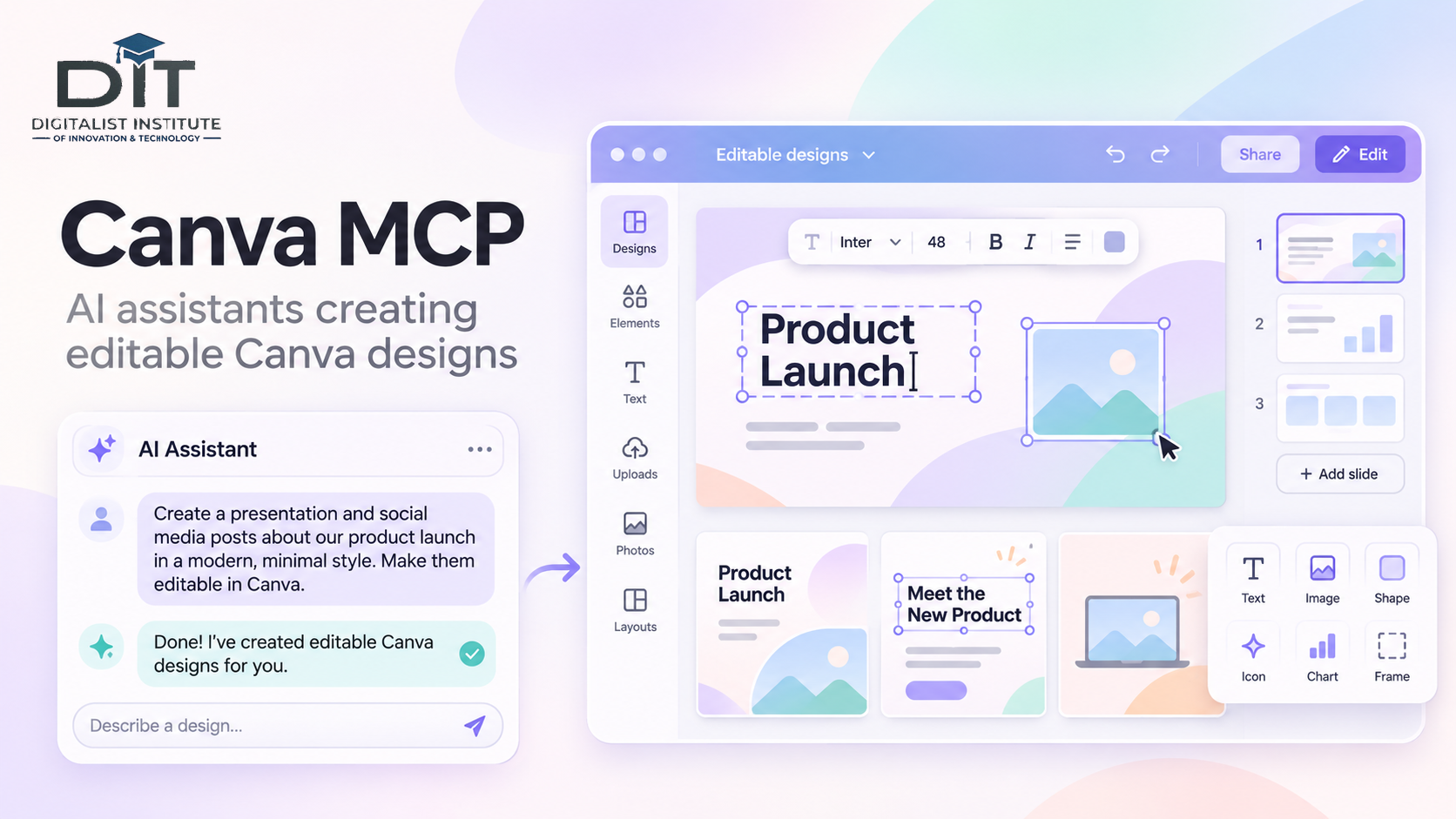
What if you could describe an Instagram campaign, a college presentation or a promotional video to ChatGPT and have Canva help create the actual design?
Not just give you ideas. Not just suggest a colour palette. Actually create a design that you can open, edit, customise and use.
That is the idea behind Canva MCP, one of the most interesting developments in AI-powered creative tools this November.
Announced by Canva on 23 November 2026, the latest expansion makes Canva's creative capabilities accessible to AI assistants and developers through its Model Context Protocol (MCP) server. It allows supported AI agents to work with Canva's design capabilities instead of limiting their output to text.
Canva also announced new capabilities for AI-assisted video generation, image creation, background removal, resizing and editable designs.
There is an especially interesting opportunity here for Indian students, educators, freelancers, marketing professionals and small-business owners.
The best part? You do not necessarily need a paid Canva account to get started. Canva's AI Connector is available to Canva Free and Canva Education users, although individual features have different usage limits and plan requirements.
Let's understand what this means and how you can try it.
What Is Canva MCP?
MCP stands for Model Context Protocol. It is a standard that allows AI assistants to connect with external tools and services.
Think of ChatGPT as your creative director and Canva as your design studio.
Normally, you might ask ChatGPT to write an Instagram caption, suggest a poster layout or prepare the content for a presentation. You would then copy that information, open Canva and manually create the design.
With an AI assistant connected to Canva, the process can be much more direct.
You describe what you want, and the assistant can use supported Canva tools to generate or modify the creative asset.
For example, you could ask:
"Create a premium Instagram promotional post for a Mumbai-based fitness studio. Use a black and gold colour scheme, include a free trial offer, and make the design suitable for Instagram."
The assistant can use Canva's available capabilities to create a design that you can subsequently refine.
Canva MCP supports workflows involving editable designs, image generation, video generation, resizing, background removal and exporting.
Importantly, the resulting design can remain editable in Canva. You are not necessarily receiving just one flattened image that cannot be modified.
That distinction makes this development particularly interesting.
Why Is Canva MCP Trending in November 2026?
The announcement is worth paying attention to because Canva is seeing significant adoption of AI-assisted creative workflows.
According to Canva's own announcement:
- Nearly 500,000 people signed up for Canva through MCP in the preceding month.
- MCP usage increased by 93% in October compared with September.
- Four out of ten first-time users coming through MCP were new to Canva.
- Canva says its MCP server already powers millions of design tasks inside AI assistants.
These are company-reported figures, rather than independently audited performance statistics, but they indicate substantial interest in connecting AI assistants with creative software.
The announcement also received attention on X and Product Hunt.
Canva's Product Hunt listing reached the top five in its launch-day ranking, reaching number four with 143 points in the snapshot checked on 26 November.
The bigger story is not simply that Canva has introduced another AI feature.
It is that AI assistants are becoming connected to the software people already use for their daily work.
Instead of switching between five different applications, users can increasingly describe an outcome and allow connected tools to handle parts of the process.
For students, professionals and creators, this could change how everyday creative work gets completed.
What Can Canva MCP Actually Do?
Let's explore the important capabilities.
1. Generate editable presentations using AI
One of the most useful applications is presentation creation.
Imagine that you have to prepare a presentation for a college assignment, client meeting or corporate training session.
You can provide your topic and explain the audience, desired number of slides and visual style.
An AI assistant connected to Canva can help turn that brief into a presentation.
For example:
"Create a 10-slide presentation explaining artificial intelligence to first-year college students in India. Use simple language, colourful diagrams, real-world examples and a professional educational design."
You can then review the presentation and make changes in Canva.
This is particularly useful for educators and students who spend considerable time creating presentations.
2. Create social media posts and marketing creatives
Canva MCP can help turn a marketing brief into visual content.
You can request an Instagram post, promotional graphic, carousel or other supported design.
For example, a small restaurant could request a weekend promotion with:
- A headline and promotional offer.
- A suitable food image.
- A clear call to action.
- A consistent colour scheme.
- An Instagram-friendly layout.
Instead of starting with a blank page, you can begin with an AI-generated design and refine it.
The important advantage is editability. You can adjust the wording, image placement, colours and other design elements in Canva.
3. Generate images and edit existing visuals
Canva is also making its image-generation model, Canva Craft, available through MCP and APIs.
This allows connected AI workflows to generate standalone images, illustrations, graphics, icons and other visual assets.
There is another interesting capability called Magic Layers.
It can transform a flat image into an editable design with individual elements that can be moved and adjusted.
Imagine receiving a promotional graphic where you want to change the headline, replace the product image or move an element.
Instead of recreating the entire design, you can work with its editable components.
This is particularly valuable for marketing teams and people who create content regularly.
4. Generate videos using AI assistants
This is arguably one of the most exciting parts of Canva's November announcement.
Canva has introduced workflows for generating editable, on-brand videos from a creative brief inside ChatGPT and Claude.
The announced workflow uses advanced models, including Seedance 2.5, alongside purpose-built templates.
You can upload reference images and brand assets, describe the video you want, and review a proposed production plan before generation.
After generation, you can continue editing the video in Canva.
The editor supports further refinement, including captions, trimming, background removal and other editing operations.
For example, a business launching a new product could request a short product introduction video using its product photographs and brand references.
However, there is an important qualification: video generation through Canva MCP in ChatGPT and Claude is available only in select markets, and feature access depends on the assistant and account. The specific Claude workflow described by Canva requires a paid Claude subscription.
5. Resize and repurpose existing designs
Creating one design is only half the job.
A creator may need the same campaign in several formats:
- Instagram square post.
- Instagram Story.
- YouTube thumbnail.
- LinkedIn graphic.
- Presentation slide.
Canva MCP also introduces capabilities for resizing creative assets and exporting finished work.
This can reduce repetitive design work, particularly when businesses need to maintain consistent branding across multiple platforms.
Is Canva MCP Free? What Can Indian Users Access?
This is probably the most important question for students and professionals.
The answer is that Canva offers free access to its AI Connector, but not every AI-powered feature is unlimited or included in every plan.
Here is how to understand it.
Canva Free
You can connect a Canva Free account to supported AI assistants, including ChatGPT, and access supported design capabilities.
AI-generated designs and images consume your Canva AI allowance. Once you reach the applicable limit, you may need to wait for the allowance to refresh or upgrade.
Canva Education
Canva Education accounts are also supported by the AI Connector. Some advanced features depend on the specific account and its permissions.
Canva Pro and other paid plans
Paid plans unlock additional capabilities, including access to Brand Templates. Autofill also has plan restrictions and is not available on Canva Free.
ChatGPT and other AI assistants
Your AI assistant has its own usage restrictions. Connecting Canva does not automatically provide unlimited access to the assistant's paid models or features.
The key takeaway is simple: you can start exploring the Canva AI Connector without purchasing Canva Pro, but check the available features and allowances before planning a large production workflow.
For official details, visit Canva's AI Connector help page:
https://www.canva.com/help/mcp-agent-setup/
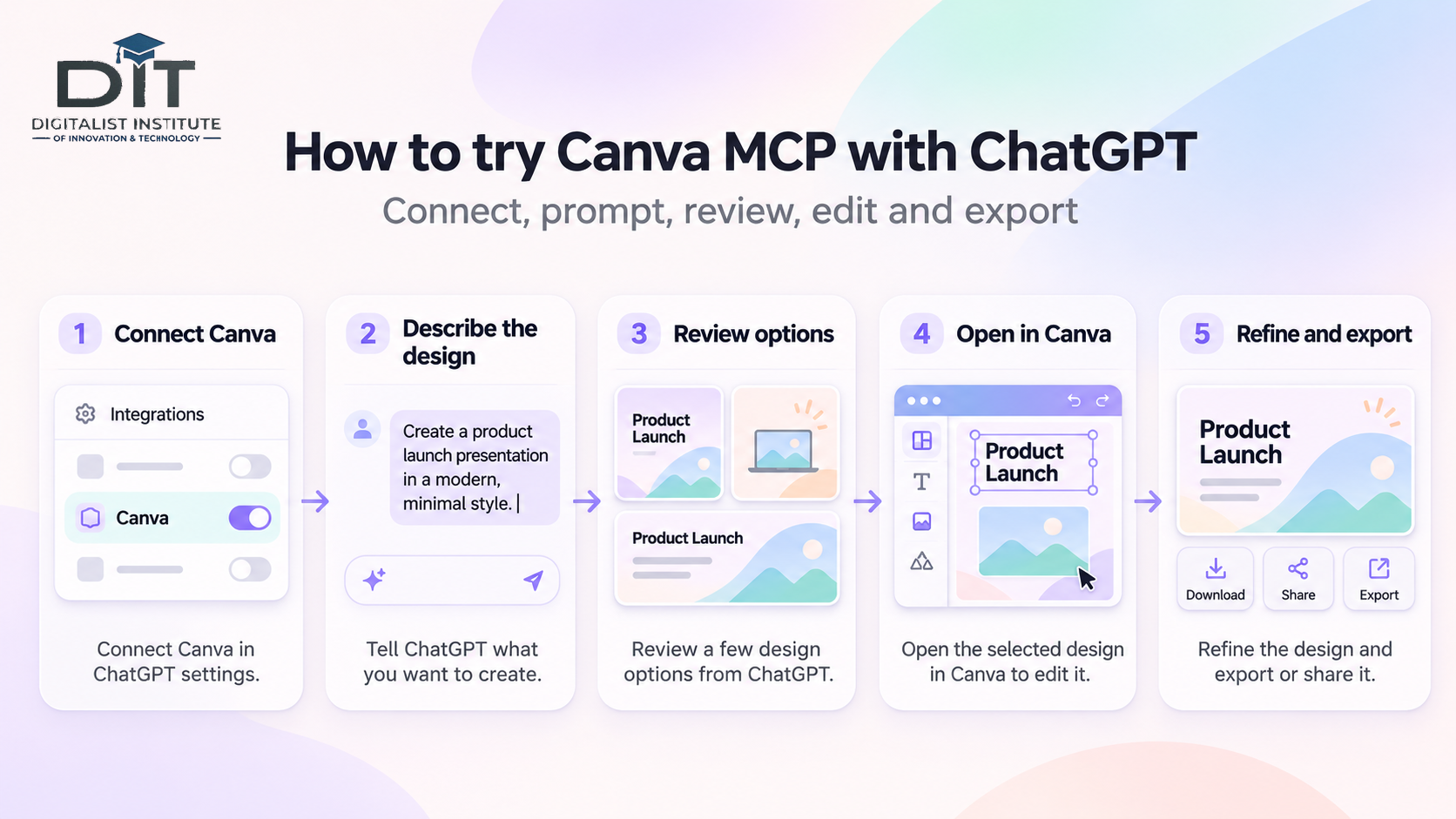
How to Try Canva MCP With ChatGPT: Step-by-Step Guide
You do not need to build an AI application or understand programming to try the everyday Canva AI Connector.
Here is a suggested starting workflow.
Step 1: Create or log in to your Canva account
Visit:
Log in to your existing account or create a free account.
You do not need to purchase Canva Pro just to connect the AI Connector.
Step 2: Open ChatGPT
Log in to ChatGPT.
Go to Settings and open the Plugins or connected-apps section.
Find Canva in the available integrations.
Step 3: Connect your Canva account
Select Canva and follow the authorisation instructions.
You may be asked to log in to Canva and grant permission to connect the two services.
Review the permissions before authorising the connection.
Step 4: Start a new creative task
Open a chat with Canva enabled.
Instead of writing a generic prompt, provide a detailed creative brief.
For example:
"Create a premium Instagram carousel about five AI tools every college student should know in 2026. Use a modern pastel theme, clean typography, simple illustrations and a professional educational style. Make the design editable in Canva."
Step 5: Review the generated options
Review the available designs and select the one you prefer.
Do not assume the first result is automatically the best.
Check the layout, text, colour combinations, image quality and readability.
Step 6: Open the design in Canva
Select the option to save or open the design in Canva.
This is important because only designs you select from ChatGPT are saved to your Canva account.
Once opened, you can continue editing the design.
Step 7: Refine and export
Make the necessary changes.
Check spelling, alignment, branding, image quality and the final dimensions.
When satisfied, export the design in the format you need.
You can also explore other supported capabilities, such as image generation, resizing and turning flat images into editable designs.
Important: The exact tools displayed can differ depending on your assistant, Canva plan and AI allowance. Some features may not appear in every account.
Three Practical Ways Indians Can Use Canva MCP
Let's move beyond the technology and look at practical applications.
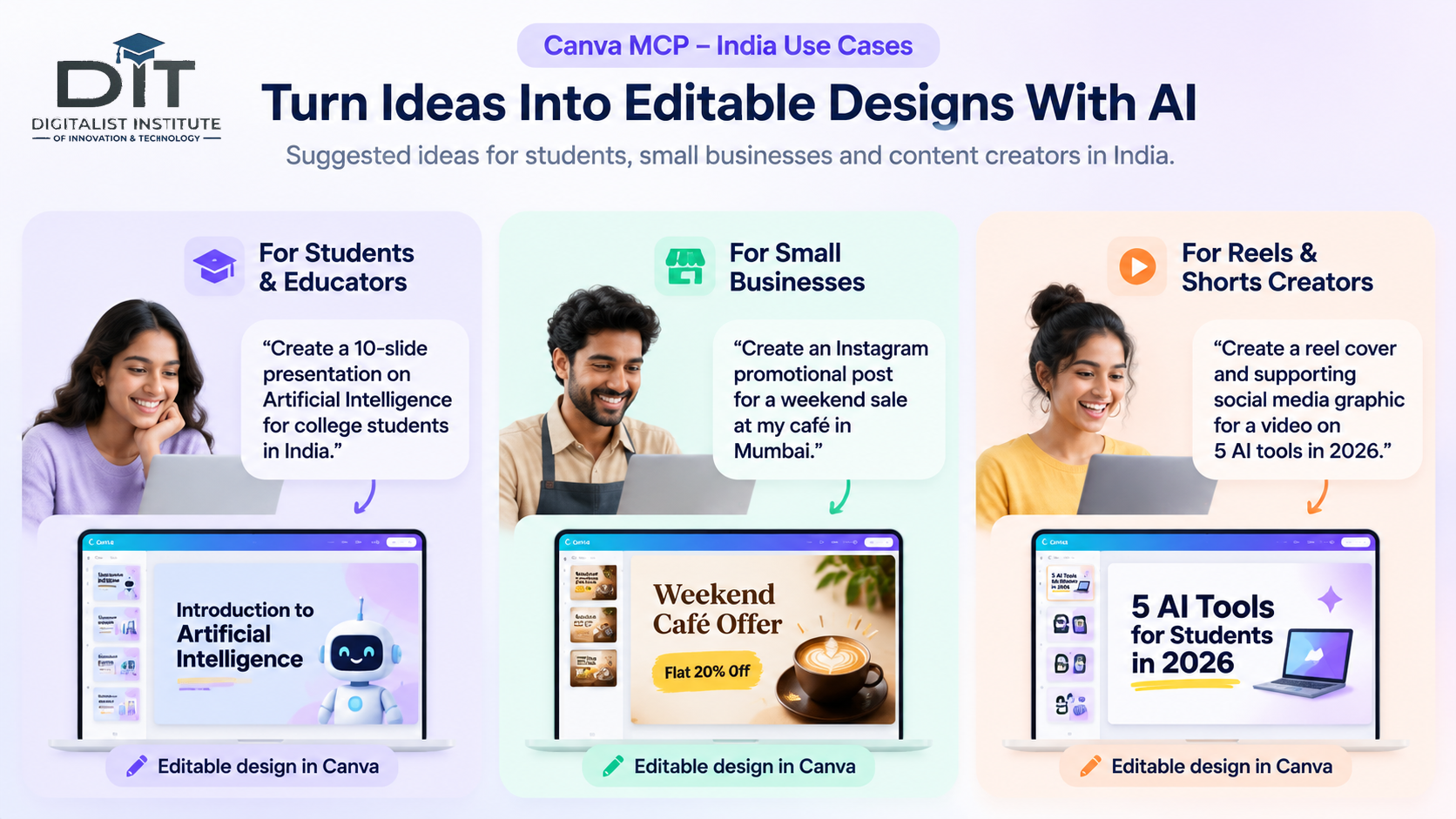
1. For Indian students and educators
Students regularly have to prepare presentations, assignments, seminar posters and project reports.
A student studying commerce could ask an AI assistant to create a presentation about India's Union Budget.
A science student could request an illustrated presentation explaining the human digestive system.
A college student preparing for a competition could create an event poster, presentation and social media announcement from the same brief.
Teachers could also use AI-assisted design workflows to create worksheets, classroom posters and educational presentations.
The objective should not be to submit AI-generated work without understanding it.
Instead, students should use AI to improve the quality of their work while checking the accuracy of the information.
2. For Indian small businesses
Imagine a local clothing store in Mumbai.
The owner wants to promote a weekend sale but does not have a dedicated graphic designer.
A possible workflow would be:
- Upload product photographs.
- Explain the discount and target audience.
- Ask the assistant to create promotional graphics.
- Review the design in Canva.
- Adjust the prices, dates and product information.
- Export the final graphics.
The same approach could be useful for restaurants, coaching centres, salons, gyms, mobile shops and local retailers.
Small businesses can experiment with creating marketing material without needing to learn professional graphic design software first.
3. For Instagram Reels and YouTube Shorts creators
Creators need a continuous supply of visual content.
A single content idea often needs a thumbnail, a cover graphic, supporting images, captions and sometimes a short promotional video.
A creator could ask:
"Develop a visual campaign for a 30-second Instagram Reel explaining five AI tools for beginners. Create a matching cover, three supporting social media graphics and a video concept. Use a consistent colour palette and bold, readable typography."
The assistant can help prepare the supported creative assets.
If video generation is available for the account and region, the creator can explore the video workflow as well.
This is particularly useful for creators who want to spend more time researching, scripting and presenting instead of repeatedly designing every visual from scratch.
A Suggested DIT Practical Challenge
Here is a simple demonstration idea that educators and AI trainers could use to explain this technology.
Challenge: Build a complete marketing campaign using AI.
Choose a fictional Indian business, such as a café in Mumbai.
Give your AI assistant this brief:
"Act as a creative marketing team. Develop a promotional campaign for a new café in Mumbai. Create an Instagram promotional post, a five-slide carousel, a promotional poster and a short video concept. Use a premium visual identity with consistent colours and typography. Make the supported designs editable in Canva."
Then evaluate the results on five parameters:
- Quality of the creative brief.
- Visual consistency across designs.
- Accuracy of the information.
- Ease of editing.
- Time required to complete the campaign.
This is a suggested demonstration, not a claim that every requested asset will be generated in one click. The actual output depends on the connected assistant and available Canva features.
It also teaches an important AI skill: giving precise instructions, evaluating outputs and improving them through iteration.
What Are the Limitations of Canva MCP?
Although the technology is promising, there are several limitations worth understanding.
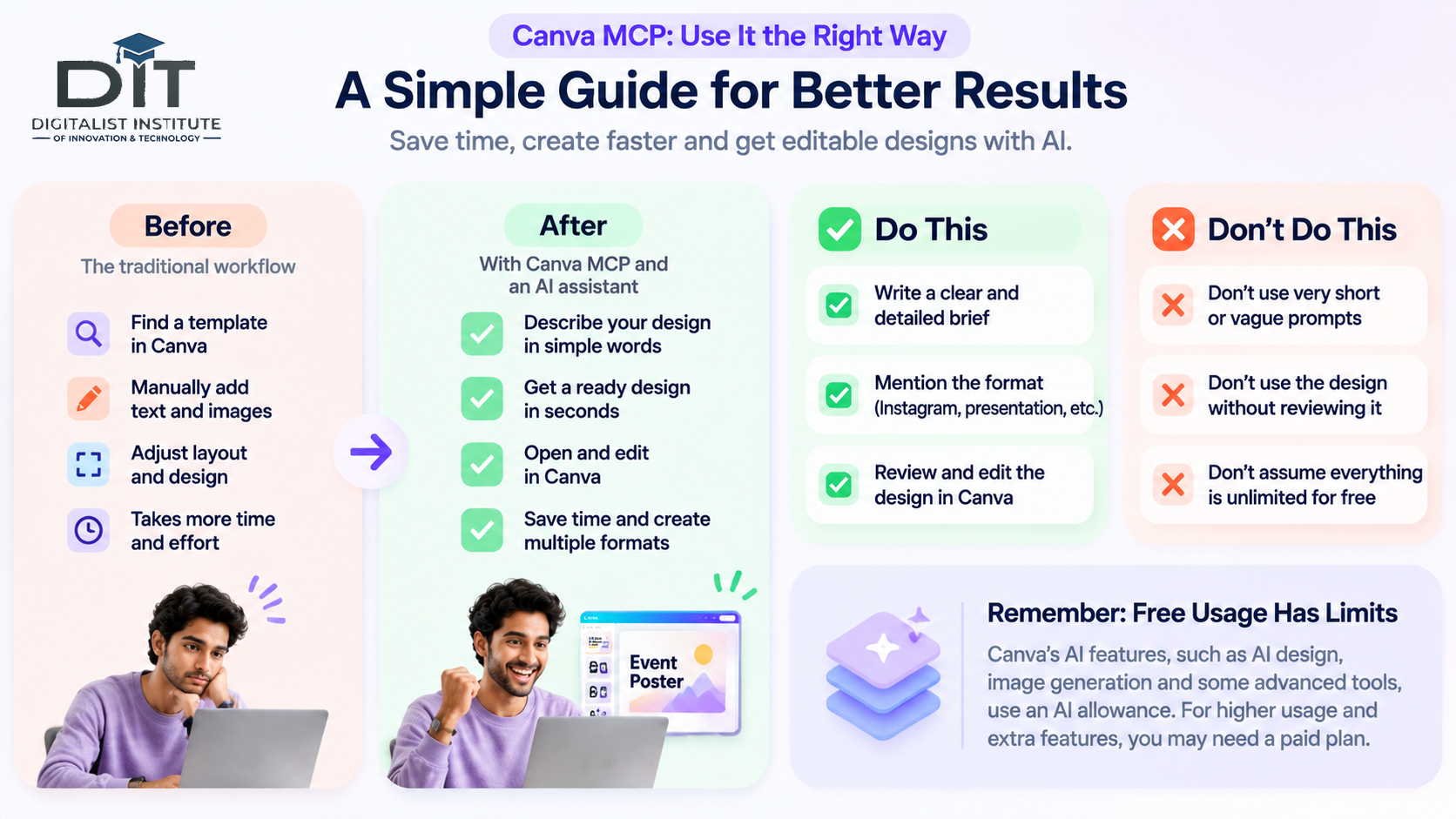
1. AI-generated designs need human review
An AI assistant can misunderstand a brief, choose an unsuitable image or create a visually inconsistent design.
You should always review the final output.
2. Free usage is limited
Canva AI generation uses an allowance. Your AI assistant may also impose separate usage limits.
Do not assume you can create an unlimited number of presentations, images or videos for free.
3. Not every feature is available to every account
Some capabilities require paid plans.
For example, Brand Template search has paid-plan restrictions, and Canva's background removal capability in the ChatGPT workflow requires Canva Pro or above.
Video generation is also subject to market and assistant availability.
4. The output may require editing
AI-generated text can contain spelling mistakes, incorrect figures or awkward wording.
For professional campaigns, manually check every price, date, address, contact number and promotional claim.
5. Connected-account permissions matter
When you connect an AI assistant to Canva, the assistant can access certain design details and folders and create or edit designs according to the permissions granted.
If you use an organisational Canva account, the administrator may need to enable third-party integrations.
Avoid connecting sensitive company workspaces without approval. Review the permissions and account settings before authorising access.
6. AI does not replace creative judgement
A design can be technically correct but still fail to communicate the right message.
Brand identity, cultural context, audience understanding and storytelling remain important.
AI should accelerate creative work, not eliminate the need for creative thinking.
Canva MCP vs Traditional Canva: What Has Changed?
The difference is primarily how users initiate and manage their creative work.
With traditional Canva, you generally start inside the design application, select a format or template and manually build your creative.
With an AI-connected workflow, you can begin with a natural-language brief inside a supported assistant and let it call Canva's tools.
| Traditional Canva | Canva with AI Connector | | --------------------------- | -------------------------------------------- | | Start by choosing a design | Start by describing your goal | | Manually arrange elements | AI can generate supported designs | | Search for assets yourself | Ask the assistant to find or generate assets | | Manually adapt designs | Use supported editing and resizing tools | | Switch between applications | Work from a connected assistant |
This does not mean traditional Canva is becoming unnecessary.
In fact, the editor remains important because human review and customisation are essential to producing professional work.
Frequently Asked Questions About Canva MCP
1. What does Canva MCP stand for?
Canva MCP refers to Canva's Model Context Protocol integration. It allows compatible AI assistants and agents to access Canva's creative capabilities through a standardised connection.
2. Can I use Canva MCP for free?
Yes, you can access Canva's AI Connector using a Canva Free account. However, AI generation consumes your Canva AI allowance, and some advanced features require paid plans. Your AI assistant may also have separate limits.
3. Can I use Canva MCP inside ChatGPT?
Yes. Canva provides an official AI Connector for ChatGPT. You can connect your Canva account, describe the design you want and access supported Canva capabilities from your conversation.
4. Can Canva MCP create videos?
Canva announced video-generation workflows inside ChatGPT and Claude. These can create editable, on-brand videos from creative briefs, using models including Seedance 2.5. Availability is limited to select markets and depends on the assistant and account.
5. Do I need coding knowledge to use Canva MCP?
No coding knowledge is required to use Canva's everyday AI Connector through a supported assistant. The separate developer-facing MCP server is intended for people building integrations, applications and AI-agent workflows.
The Bigger Lesson: AI Is Becoming a Creative Partner
The most important takeaway from Canva's latest announcement is not that another AI image generator has arrived.
It is that AI assistants are becoming connected to the applications where people actually do their work.
We are moving from asking AI to write a caption to asking it to help produce an entire campaign.
From requesting presentation ideas to creating an editable presentation.
From generating a video script to exploring a connected video-production workflow.
This shift will create new opportunities for students, professionals, entrepreneurs and creators who understand how to use these tools effectively.
However, knowing how to use an AI tool is only the beginning. The real advantage comes from combining AI with communication, creativity, critical thinking and domain knowledge.
If you want to understand how these tools fit into real-world workflows, explore the practical AI learning opportunities at DIGITALIST Institute of Innovation & Technology.
You can also visit DIGITALIST Institute's website to explore its AI learning programmes and free workshop opportunities.
Your next step: Connect Canva to a supported AI assistant, create one useful design and see how much of your creative workflow you can simplify.
The future of design is not necessarily about learning every design tool. It is about learning how to direct the tools intelligently.
Sources
- Canva official announcement, 23 November 2026: Building the design layer of the internet. https://www.canva.com/newsroom/news/canva-mcp-update/
- Canva official announcement: Campaign-ready video generation and Magic Layers. https://www.canva.com/newsroom/news/canva-mcp-video-generation/
- Canva Help Centre: Connecting Canva to AI assistants. https://www.canva.com/help/mcp-agent-setup/
- Canva Help Centre: Creating designs with Canva in ChatGPT. https://www.canva.com/help/connect-chatgpt-to-canva/
- Canva on Product Hunt. https://www.producthunt.com/products/canva?launch=canva
Editorial note: Product capabilities, access conditions and usage limits are based on information available on 26 November 2026. Canva may update these features and restrictions.